
Custom Cursor for Chrome: Fun & Fast
Overview
The software is a browser extension designed to replace the default cursor in Chrome with a custom visual style, offering a playful and immersive browsing experience. It is tailored for users seeking to personalize their web environment with unique cursor designs, particularly those interested in gaming or fun-themed customization. The extension activates automatically upon reopening Chrome, ensuring a seamless transition from the standard cursor to the chosen design.
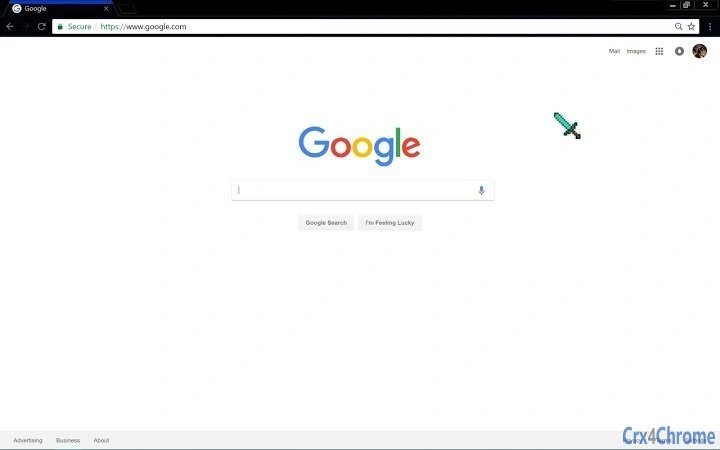
It supports multiple cursor themes, including the Diamond Minecraft Sword, which appeals to fans of the popular game. The developer did not provide additional information about the team or background, so details remain limited to the extension’s core functionality. Real-world usage includes enhancing the visual appeal of web browsing, especially during gaming sessions or casual navigation.
The extension is intended for individual users who value aesthetic customization and enjoy subtle interactive enhancements while using Chrome.
Key Features & Capabilities
- Custom Cursor Replacement – Instantly swaps the default Chrome cursor with a user-selected design, such as the Diamond Minecraft Sword, upon browser restart.
- One-Click Activation – No complex setup required; the cursor change takes effect immediately after closing and reopening Chrome.
- Themed Cursor Designs – Offers visually distinct cursor styles, with at least one gaming-inspired option appealing to Minecraft enthusiasts.
- Compatibility with Chrome – Designed specifically for the Chrome browser, ensuring smooth integration with the platform’s extension ecosystem.
- Lightweight Installation – The extension has a minimal footprint of 2.5 MB, making it efficient for systems with limited storage.
These features allow users to transform their browsing experience with minimal effort. For example, a gamer might use the Diamond Minecraft Sword cursor to create a themed environment while playing browser-based games. Similarly, casual users can enjoy a fun visual change without altering system-wide settings. The extension’s lightweight nature ensures it does not significantly impact browser performance. It is ideal for users who want to add a touch of personality to their digital workspace without technical complexity.
User Interface, Workflow & Performance
The extension’s interface is minimal, as it operates primarily in the background without a dedicated user dashboard. Users interact with it indirectly through the browser’s extension management page, where they can enable or disable the cursor replacement. Navigation is straightforward, relying on standard Chrome extension controls.
The workflow is simple: install the extension, close and reopen Chrome, and the custom cursor appears. No additional configuration is required. Performance observations are based on general software behavior patterns, as specific resource usage details were not provided.
The extension does not appear to interfere with page loading or rendering, and no stability issues were reported in the available information. The developer did not specify resource usage details, so CPU and RAM behavior remain unknown. However, its small size suggests low overhead, and it is expected to run efficiently on most modern systems.
Compatibility & System Requirements
The extension is compatible with both Windows and Mac operating systems, supporting Chrome as the primary browser. The software version is listed as 1.2, and the installation size is 2.5 MB. No further hardware or system requirements were specified.
The developer did not provide additional details about minimum RAM, processor speed, or storage needs. Compatibility information was partially provided, and users should ensure their Chrome browser is up to date for optimal functionality. Some limitations may arise if other extensions, such as Infinity New Tab, are active, as they may interfere with the cursor replacement.
The extension does not require administrator privileges or complex setup procedures.
Pros and Cons
Pros
- Free to download and use with no hidden costs.
- Simple one-click activation after browser restart.
- Lightweight at just 2.5 MB, minimizing system impact.
- Offers fun, themed cursor designs like the Diamond Minecraft Sword.
- Works seamlessly on both Windows and Mac platforms.
Cons
- Compatibility issues may occur with other Chrome extensions like Infinity New Tab.
- No visible user interface or settings panel for customization.
- Developer information is not available, limiting transparency.
- Performance and resource usage details were not disclosed.
- Only supports Chrome, limiting cross-browser use.
FAQ Section
Is this extension safe to install?
The extension is available through a public link and appears to be designed for personal customization. No security risks were reported in the provided information. As with any browser extension, users should only install from trusted sources.
Does it work on all browsers?
Based on the available information, the extension is designed exclusively for Chrome. It does not support other browsers such as Firefox or Edge.
Can I update it automatically?
Chrome handles updates for extensions automatically when available. The latest version, 1.2, is already released and should be updated through the browser’s extension manager.
Is the extension free?
Yes, the extension is completely free to download and use. No payment or subscription is required.
Does it work offline?
Yes, once installed, the cursor replacement functions without requiring an internet connection. The extension runs locally within the browser.
Final Thoughts + CTA
This Chrome extension delivers a simple yet effective way to personalize your browsing experience with fun, themed cursor designs. Its lightweight nature, ease of use, and zero cost make it ideal for casual users and gamers who enjoy small visual enhancements. While it lacks advanced customization options and transparency from the developer, its core functionality is reliable and fast.
The inclusion of a popular gaming-themed cursor like the Diamond Minecraft Sword adds unique value. For users seeking a quick, secure, and free way to refresh their Chrome interface, this tool is a solid choice. Download Custom Cursor for Chrome: Fun & Fast now to enjoy a more engaging browsing experience.
Download Custom Cursor for Chrome: Fun & Fast now







